In today’s connected world, a reliable Wi-Fi signal has become an essential part of daily life. From video calls and online classes to streaming entertainment and working remotely, most households depend heavily on stable internet connectivity. Because of this reliance, even small problems with Wi-Fi coverage can quickly become frustrating.
Many people have experienced weak signals in certain rooms of their home, slow downloads, or buffering while watching videos. These issues often lead homeowners to search for quick and affordable ways to improve their wireless signal.
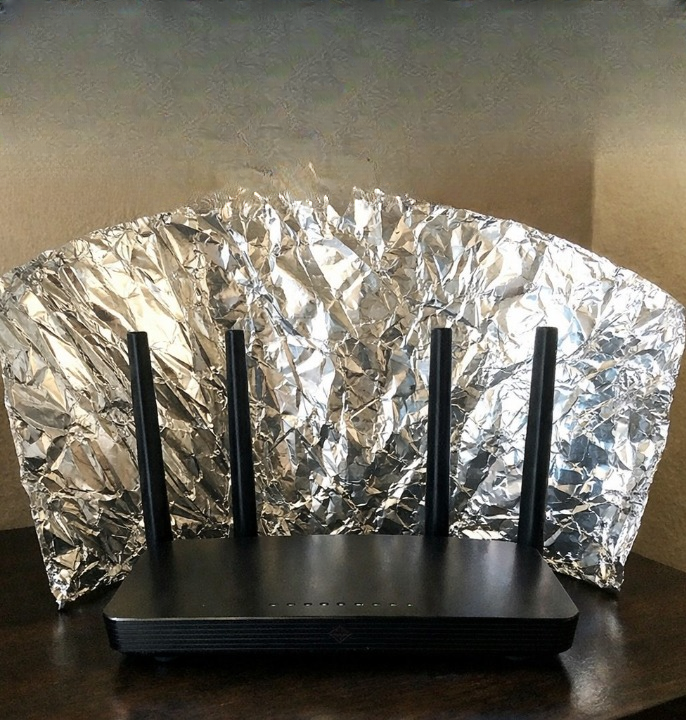
One unusual solution that has gained attention online is placing aluminum foil behind a Wi-Fi router. Photos and discussions about this technique appear frequently on social media and technology forums. Some people claim that shaping aluminum foil behind a router can improve signal strength in specific areas of a home.
At first glance, the idea may sound like a simple internet myth or an exaggerated household trick. However, there is actually some scientific reasoning behind why people experiment with this method.
In this article, we will explore:
-
Why people place aluminum foil behind their routers
-
The science behind Wi-Fi signals and metal reflection
-
Whether this method can truly improve signal strength
-
Situations where it might help
-
Situations where it may not be effective
-
Better long-term solutions for improving Wi-Fi performance
By understanding how wireless signals behave, you can make more informed decisions about optimizing your home network.
Understanding How Wi-Fi Signals Work
Before examining the aluminum foil method, it is helpful to understand how Wi-Fi signals function.
Wi-Fi routers transmit radio waves, which are a form of electromagnetic energy. These radio waves carry internet data from the router to connected devices such as smartphones, laptops, and smart televisions.
Unlike wired connections, wireless signals spread outward through the air. When a router sends out its signal, it typically radiates in multiple directions rather than focusing on a single path.
Because of this broadcast pattern, several things can affect signal quality:
-
Walls and building materials
-
Furniture and large objects
-
Distance from the router
-
Other electronic devices
-
Interference from neighboring networks
When signals travel through these obstacles, they may weaken before reaching certain parts of the home. This is why some rooms have strong Wi-Fi connections while others experience slower speeds or dropped signals.
The Idea Behind Using Aluminum Foil
The concept of placing aluminum foil behind a Wi-Fi router is based on the idea that metal surfaces can reflect radio waves.
In simple terms, aluminum foil may act as a reflective surface that redirects part of the Wi-Fi signal. Instead of allowing the signal to spread evenly in all directions, the foil may bounce some of the signal back toward a specific area.
People who try this technique usually place a curved sheet of foil behind the router’s antennas. The curved shape is meant to direct the wireless signal toward a room or location where stronger connectivity is needed.
For example, if a router sits near an exterior wall, a portion of its signal may travel outside the house. Placing foil behind the router could potentially redirect some of that signal back toward the interior of the home.
This is why the idea has attracted attention from individuals looking for simple ways to improve their Wi-Fi coverage.
How People Set Up the Aluminum Foil Method
One reason the aluminum foil approach became popular online is that it requires very little equipment or technical knowledge.
Most people already have aluminum foil in their kitchen, which makes it easy to experiment with the technique.
The process typically involves the following steps:
-
Tear off a sheet of aluminum foil.
-
Bend the foil into a curved or semi-circular shape.
-
Place the curved foil behind the router or its antennas.
-
Adjust the angle so that the reflective surface faces the area where better signal is desired.
Some individuals place the foil against a small piece of cardboard or other backing to help maintain the curved shape. Others experiment with different angles or sizes to see whether the signal changes.
Although the setup is simple, results can vary depending on several factors.
The Science Behind Metal and Wireless Signals
To understand whether this method can work, it is important to look at how radio waves interact with metal surfaces.
Radio waves can behave in several ways when they encounter obstacles:
-
Reflection – the signal bounces off a surface
-
Absorption – the signal is partially absorbed by a material
-
Diffraction – the signal bends around edges
-
Scattering – the signal spreads in multiple directions
Metal surfaces are particularly good at reflecting radio waves. This is why metal objects can sometimes interfere with wireless signals or create unexpected signal patterns.
In some controlled experiments, researchers have shown that reflective surfaces can help shape the direction of wireless signals. By carefully positioning reflective materials, it is possible to guide signals toward specific areas.
However, the results depend heavily on the design of the reflector and the surrounding environment.
What Research Says About the Aluminum Foil Technique
Some academic studies have explored ways to shape Wi-Fi signals using specially designed reflectors.
In these experiments, researchers used structured materials and carefully calculated shapes to redirect wireless signals. In certain cases, they were able to improve signal strength in targeted areas.
However, these research setups were more precise than simply placing a sheet of foil behind a router. The reflectors were carefully engineered to produce predictable signal patterns.
A simple foil reflector may produce small changes in signal direction, but it does not offer the same level of control.
As a result, while the basic concept has scientific support, the practical impact in everyday homes may be limited.
Situations Where the Aluminum Foil Method Might Help
Although it is not a universal solution, the aluminum foil technique may provide minor improvements in certain situations.
Router Located Near an Exterior Wall
If your router sits close to an outside wall, a portion of the signal may travel outdoors. Placing foil behind the router could redirect some of that signal back into the home.
Improving Signal in One Specific Room
If you mainly want stronger Wi-Fi in a nearby room—such as a home office or bedroom—the foil may help focus some signal in that direction.
Small Apartments or Single-Level Homes
In smaller living spaces, small adjustments in signal direction can sometimes make a noticeable difference.
Simple Experiment Without Cost
Because aluminum foil is inexpensive and easy to use, some people try it simply as a quick experiment.
Situations Where the Foil Trick May Not Work
While the technique might produce minor changes in some cases, there are many situations where it is unlikely to provide meaningful improvements.
Large or Multi-Story Homes
In larger homes, weak signals are often caused by distance or structural barriers. A small reflector is unlikely to solve these challenges.
Poor Router Placement
If the router is located in a corner or behind large objects, signal distribution may already be limited.
Outdated Network Equipment
Older routers may lack modern wireless technology and may struggle to provide strong coverage regardless of reflectors.
Need for Equal Coverage Everywhere
Redirecting signal toward one area can sometimes reduce coverage in other areas of the home.
Why Router Placement Matters More Than Foil
One of the most important factors affecting Wi-Fi performance is router placement.
Ideally, a router should be positioned:
-
Near the center of the home
-
Elevated off the floor
-
Away from large metal objects
-
Away from thick concrete walls
When routers are placed in hidden corners or inside cabinets, their signals can be blocked or weakened before reaching other rooms.
In many cases, simply moving the router to a better location provides greater improvement than any reflective surface.
Better Ways to Improve Wi-Fi Signal Strength
While aluminum foil may provide a small directional effect in certain cases, there are several more reliable ways to improve wireless performance.
Move the Router to a Central Location
Placing the router in a central area allows signals to spread more evenly throughout the home.
Adjust the Antennas
Many routers include adjustable antennas. Positioning them at slightly different angles can help distribute signals more effectively.
Upgrade to a Modern Router
Newer routers support advanced technologies that improve speed, range, and stability.
Use a Wi-Fi Extender
Wi-Fi extenders receive the existing signal and rebroadcast it to areas where coverage is weak.
Install a Mesh Wi-Fi System
Mesh networks use multiple devices placed around the home to create seamless coverage. This is often the best solution for large houses or multi-story buildings.
Use Wired Access Points
In some situations, running an Ethernet cable to another room and installing an additional access point can provide the most reliable performance.
Is the Aluminum Foil Trick Worth Trying?
Because aluminum foil is inexpensive and easy to experiment with, some people enjoy testing the idea out of curiosity.
The technique may produce a small directional change in signal strength, especially in simple environments with minimal obstacles.
However, expectations should remain realistic. The foil method is unlikely to transform a weak internet connection into high-speed coverage throughout an entire home.
For long-term improvements, investing in better network equipment or optimizing router placement usually provides much more noticeable results.
Final Thoughts
The idea of placing aluminum foil behind a Wi-Fi router may seem unusual at first, but it is loosely based on real principles of radio wave reflection.
By redirecting some of the wireless signal, a foil reflector can sometimes create a slight directional effect. In small spaces or specific situations, this may help improve signal strength in a nearby area.
However, this method should be viewed as a simple experiment rather than a guaranteed solution. Factors such as router placement, home layout, building materials, and equipment quality play much larger roles in determining Wi-Fi performance.
If you are experiencing consistent connectivity issues, exploring proven solutions—such as repositioning your router, upgrading hardware, or using mesh networking—will likely provide better results.
Understanding how wireless networks function allows you to make smarter decisions about improving coverage and maintaining reliable internet throughout your home.
And if you happen to have a spare sheet of aluminum foil nearby, trying the experiment can still be an interesting way to learn a little more about how wireless signals behave.